
For years, Google FAQ rich results were one of the easiest ways to make a standard organic listing look bigger, more useful, and more clickable. Add clear questions, mark them up with FAQPage schema, pass the Rich Results Test, and your search result could expand with dropdown-style answers directly on Google.
That playbook is over.
As of May 7, 2026, Google says FAQ rich results no longer appear in Google Search. The change is not just a visual tweak. It removes a once-popular search enhancement that many businesses used to capture more screen space, answer objections earlier, and lift visibility for informational and service-related pages. Google also confirmed that FAQ-related impressions may drop in Search Console reporting because the feature is no longer appearing.
This does not mean FAQ content is useless. It does not mean structured data is dead. And it definitely does not mean every business should delete FAQ sections from its site.
It means the purpose of FAQ content has changed.
In this blog post, we’ll explore what Google’s removal of FAQ rich results means for businesses, whether you should keep or remove FAQ schema, and how to turn FAQ sections into stronger content assets for traditional search, AI search, and real user decision-making.
Let’s get in!
What Changed With Google FAQ Rich Results?
Google’s documentation updates show a clear timeline.
In August 2023, Google first reduced the visibility of FAQ rich results, limiting them mainly to well-known, authoritative government and health websites. Google said the change was part of an effort to create a cleaner and more consistent search experience. It also clarified that unused structured data did not cause problems for Search, although it had no visible effect when Google was not using it for a rich result.
Then Google went further.
On May 8, 2026, Google added a deprecation notice saying the FAQ rich result feature would no longer appear in Google Search starting May 7, 2026. On June 15, 2026, Google removed documentation for the FAQ rich result feature because it was no longer shown in Search results.
Search Console reflects the same shift. Google’s Search Console data anomalies page states that FAQ rich results stopped appearing as of May 7, 2026, and that site owners may see a drop in reported FAQ impressions in the Performance report and FAQ rich results report.
So, the practical meaning is simple:
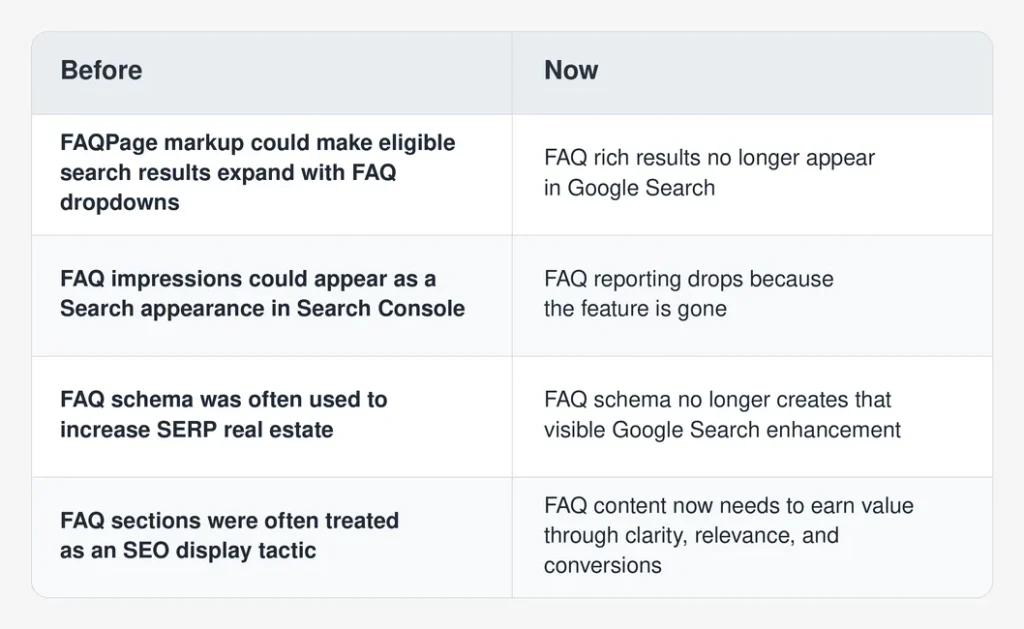
That last line is the part businesses need to focus on.
The surface-level benefit disappeared. The user need did not.
Should You Remove FAQ Schema From Your Website?
Not automatically.
Google previously stated that not using structured data doesn’t cause Search problems, even though it has no visible effect in Google Search when the rich result isn’t shown. That guidance matters because many websites still have FAQPage schema across blog posts, product pages, service pages, local pages, help centers, and landing pages.
Removing all of it may feel tidy, but it isn’t always the smartest first move.
Instead, separate the question into two parts:
- Should the visible FAQ content stay on the page?
- Should the FAQPage markup stay in the code?
Those are different decisions.
The visible FAQ content should stay if it helps users make decisions, understand your service, compare options, avoid confusion, or move closer to conversion. The markup should stay only if it is accurate, easy to maintain, and doesn’t create technical clutter, validation noise, or mismatches between visible content and structured data.
Here is a practical decision table:
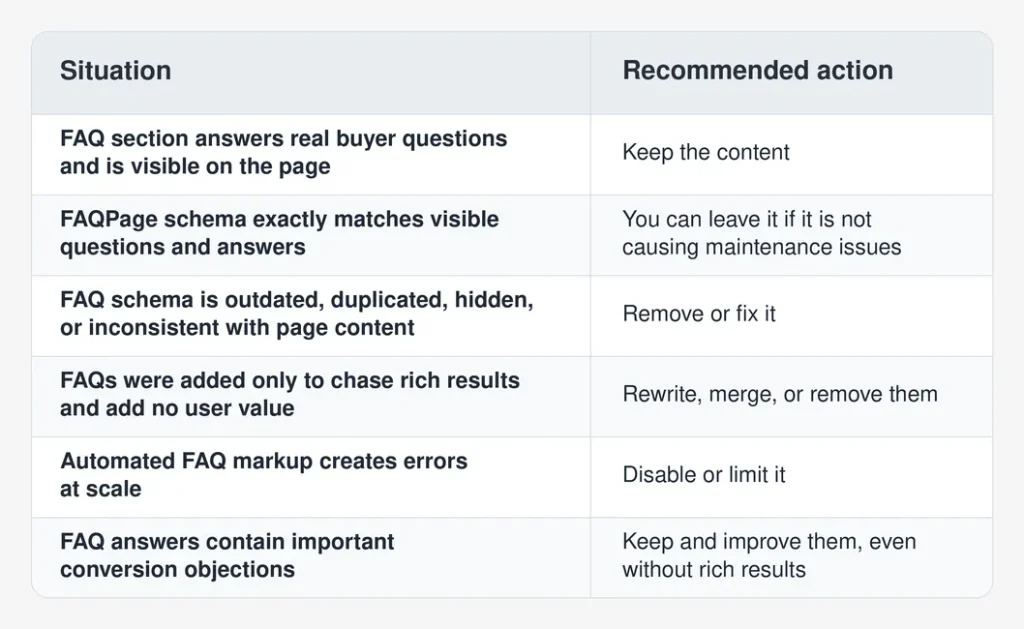
The rule is not “delete FAQ schema.” The rule is “stop treating FAQ schema as the reason the section exists.”
Why FAQ Content Still Matters After Rich Results
FAQ content became popular in SEO because it offered a visible reward. But the real value of FAQs has always been deeper than dropdowns in search results.
Good FAQ sections do four things well.
First, they answer high-friction questions before a user leaves the page. Pricing, timelines, eligibility, shipping, support, guarantees, contract terms, product fit, implementation requirements — these are not minor details. They are conversion barriers.
Second, they help organize information in a way users can scan. Not everyone wants to read a full service page from top to bottom. Some visitors arrive with one concern. A good FAQ answers it fast.
Third, FAQs can support long-tail search intent. Many users search in question format, especially when they are comparing options or trying to understand a specific problem.
Finally, clear Q&A content can support AI-led discovery. Google’s generative AI guidance emphasizes valuable, unique, non-commodity content, clear organization, crawlable technical structure, and content written for people rather than for AI systems.
FAQs can help with that — but only when they are specific, useful, and connected to the rest of the page.
A vague FAQ such as “Why choose us?” adds little.
A better FAQ answers something real: “How long does it take to recover rankings after a website migration?”
That question reflects actual buyer anxiety. It opens the door to a specific, useful answer.
[Also Read: AEO vs SEO: What Marketers Need to Know for Improved Search Visibility]
What Businesses Should Do First
Before changing your site, run a quick FAQ audit.
You do not need a huge technical project. Start with the pages where FAQ rich results used to matter most: high-traffic blog posts, service pages, product pages, category pages, location pages, and comparison content.
Review four areas.
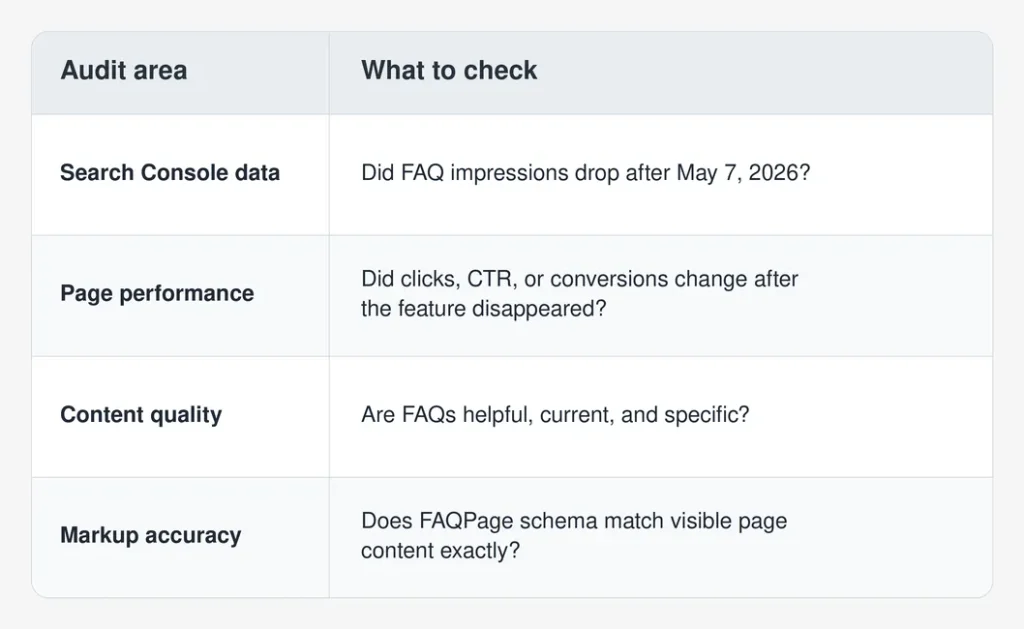
This audit matters because some pages may show no real performance impact. Others may lose CTR or impressions because the search result no longer occupies extra space.
Do not assume. Check.
Search Console may show reporting changes rather than a true ranking decline. Google noted that the 2023 FAQ and HowTo changes affected Search Console metrics and were not ranking changes. The 2026 removal can create a similar reporting shock: FAQ impressions fall because the feature is gone, not necessarily because the page lost organic relevance.
A calm audit beats a rushed rebuild.
Update SEO Reporting So Teams Do Not Misread the Drop
This is one of the most important operational steps.
If your weekly or monthly SEO report includes FAQ rich result impressions, Search appearance filters, or automated Search Console API pulls, update the dashboard and annotate the change.
Use a note like this:
Annotation: Google stopped showing FAQ rich results in Search as of May 7, 2026. FAQ impression drops after this date may reflect feature deprecation, not a loss of rankings or page quality.
That one sentence can prevent a lot of confusion.
Also check:
- Looker Studio dashboards connected to Search Console
- Search Console API workflows
- SEO reporting templates
- Client or executive scorecards
- Rich result monitoring tools
- Structured data validation processes
- Automated alerts tied to FAQ impressions
If your report shows a major FAQ visibility decline without context, stakeholders may assume something broke. In reality, Google removed the feature.
Rebuild FAQs Around User Intent, Not SERP Real Estate
The old FAQ tactic was often shallow: collect common questions, write short answers, add schema, and hope Google expands the result.
That is not enough anymore.
Now FAQ sections need to serve the page’s purpose. A blog post FAQ should help the reader go deeper. A service page FAQ should remove buyer hesitation. A product page FAQ should clarify fit, shipping, compatibility, returns, or use cases. A local page FAQ should answer questions about service areas, appointments, response times, or neighborhood-specific concerns.
Here is a better framework:
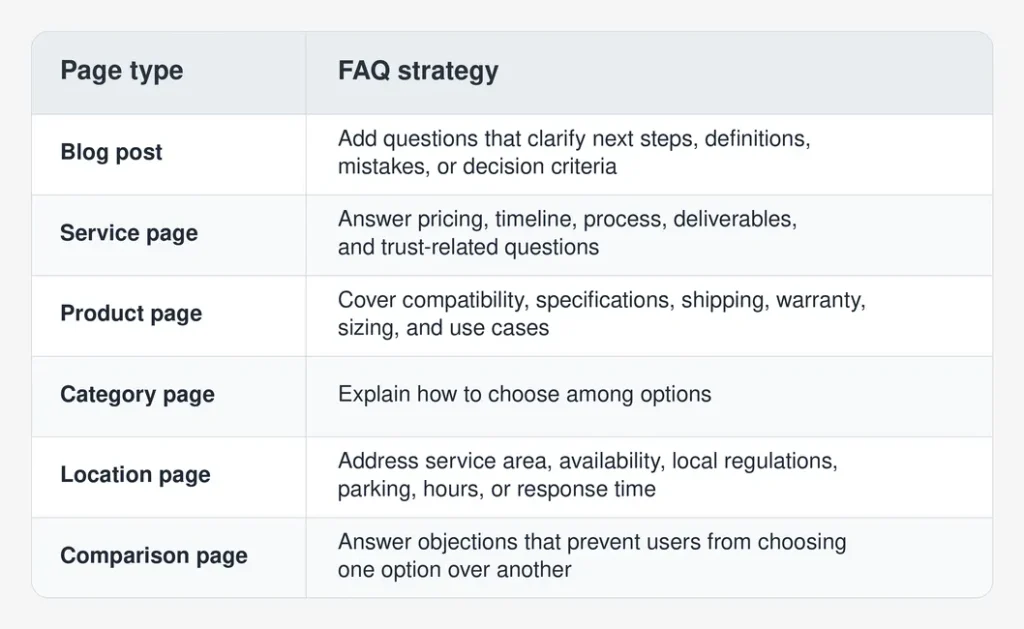
The best FAQs are not random add-ons at the bottom of the page. They are small conversion tools.
Short answers can work. Longer answers can work too. The length should match the question’s complexity. If someone asks, “Do you offer same-day appointments?” the answer can be brief.
If they ask, “Should I use a landing page or a service page for PPC traffic?” a two-sentence answer may not be enough.
Keep Structured Data Where It Still Has a Real Purpose
Google FAQ rich results are gone, but structured data still matters across other search features.
Google’s structured data ecosystem still supports eligible rich result types such as Product, Recipe, Event, Review snippets, Video, Breadcrumbs, and more, depending on the content and current documentation. The broader lesson is not that schema no longer works. It is that Google can add, reduce, or remove specific rich result experiences over time.
That is why businesses should manage structured data as a long-term technical asset, not a one-time trick.
Run a structured data inventory and classify markup into three groups:
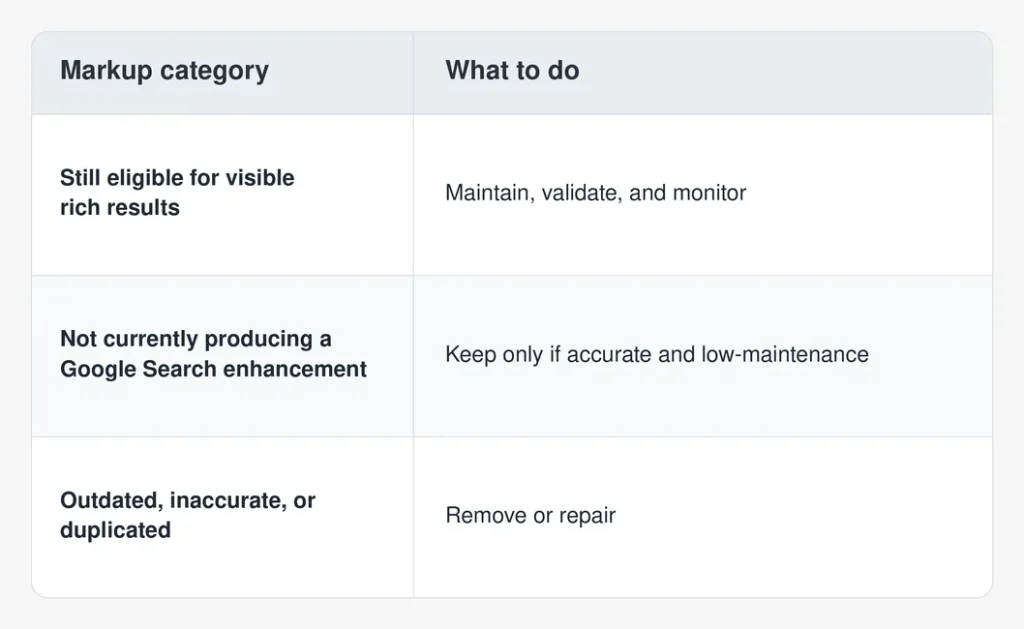
If your site uses FAQ schema through a CMS plugin, page builder, or SEO plugin, check whether it is being added automatically. Many WordPress sites, for example, generate FAQPage markup when editors use certain FAQ blocks. That may still be fine, but someone should know it is happening.
The biggest risk is not unused markup. It is inaccurate markup.
If the page says one thing and the structured data says another, fix it. Google’s AI and structured data guidance both point back to a basic principle: the page should be understandable, accurate, and useful for users.
[Also Read: Complete Technical SEO Checklist for Improved Website Rankings]
Replace FAQ Rich Result Thinking With “Answer Asset” Thinking
Businesses should stop asking, “How do we get FAQ dropdowns back?”
They are gone.
A better question is, “How do we turn answers into assets?”
An answer asset is a section of content that solves a specific user question well enough to support search visibility, sales conversations, internal linking, and possibly AI-generated summaries. It can be a paragraph, comparison table, checklist, decision tree, short video, diagram, calculator, or downloadable resource.
For example:
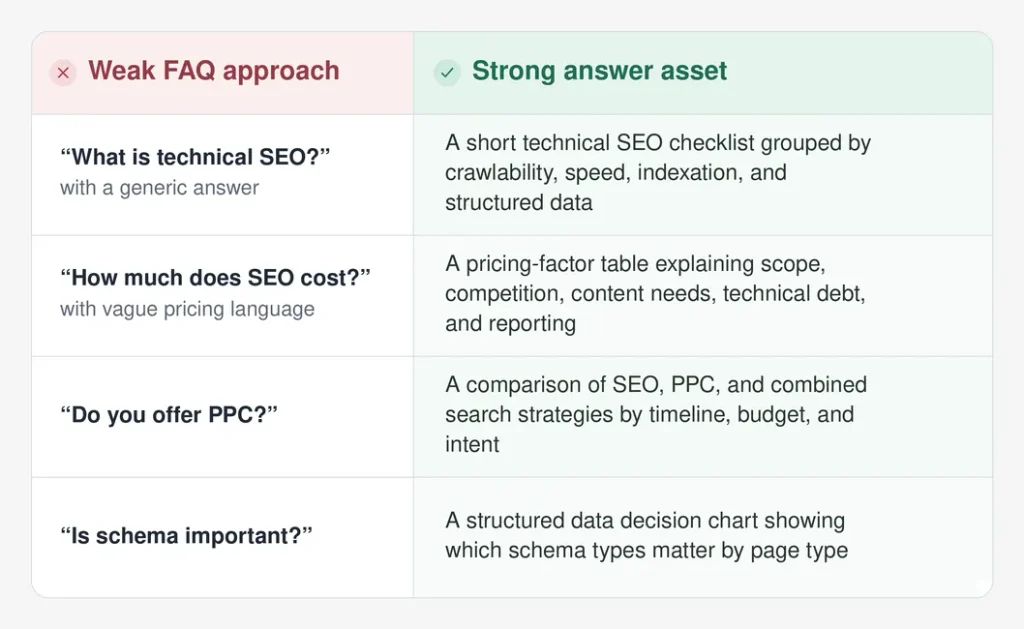
This is where content becomes more useful.
FAQ rich results rewarded format. Modern search rewards usefulness, clarity, and trust — at least over time.
Google’s 2026 guidance for generative AI search specifically encourages unique, valuable, people-first content and warns against relying on AI/GEO hacks such as special files, artificial “chunking,” or writing only for AI systems.
That guidance fits the post-FAQ-rich-result world perfectly. Businesses should not replace one trick with another. They should answer better questions in better ways.
How This Affects AI Overviews and AI Mode
FAQ rich results disappearing does not mean question-based content has become less important. In some ways, it may be more important.
AI Overviews and AI Mode often respond to complex, conversational, multi-part searches. Semrush’s 2025 AI Overviews study found that AI Overviews appeared for 6.49% of queries in January 2025, climbed to 24.61% in July, and settled at 15.69% in November. The same study found that commercial, transactional, and navigational AI Overview triggers grew during the year, meaning AI summaries were no longer limited to purely informational searches.
That matters because FAQs often sit close to those exact search behaviors.
Users ask:
- “How long does SEO take for a local business?”
- “Is Performance Max better than search campaigns?”
- “Do I need separate location pages for each city?”
- “What should I do if my organic traffic dropped but leads stayed flat?”
These are not just FAQ questions. They are decision-stage questions.
[Also Read: Maximize AI Search Visibility: 5 Optimization Tips]
Google’s generative AI documentation says SEO best practices remain relevant because AI features are rooted in Google’s core Search ranking and quality systems. It also explains concepts such as retrieval-augmented generation and query fan-out, where related queries may be used to gather broader information around a user’s original question.
So, while FAQ rich results are gone, strong answer content can still support broader AI-search visibility.
The takeaway: do not write FAQs for dropdowns. Write them because they clarify expertise.
What to Do With Existing FAQ Sections
Here is a practical cleanup workflow.
Keep FAQs That Help Users Decide
If the questions answer real buyer concerns, keep them. Better yet, improve them.
Look for FAQs that address cost, time, scope, fit, process, requirements, risk, results, guarantees, and next steps. These questions often affect conversions more than marketers realize.
Remove Thin or Repetitive Questions
Some FAQs exist only because an SEO checklist once said every page needed them.
Questions like “Why is SEO important?” or “Why choose our company?” rarely add much unless the answers are specific and useful. Delete, merge, or rewrite them.
Expand Important Answers Into Stronger Sections
If a FAQ answer is doing heavy lifting, it may deserve its own section.
For example, a service page FAQ about pricing could become a full “What Affects Cost?” section with a table. A blog FAQ about implementation could become a step-by-step checklist.
Check Markup Against Visible Content
If FAQPage schema remains, make sure every marked-up question and answer appears visibly on the page. Do not mark up hidden, outdated, or invented content.
Monitor Page-Level Performance
After cleanup, track the page’s impressions, clicks, CTR, engagement, and conversions. The goal is not to recover a removed rich result. The goal is to improve the page’s overall usefulness.
What Should Replace FAQ Rich Results in Your SEO Strategy?
Google FAQ rich results used to provide extra visual presence. Now businesses need other ways to earn attention and trust in search.
Focus on five areas.
- Stronger Titles and Meta Descriptions
When rich enhancements disappear, the basics matter more.
Your title still needs to communicate relevance quickly. Your meta description still needs to explain the value of the page. Neither one guarantees rankings, but both influence how users understand your result.
- Better Internal Linking
FAQs often reveal what users want next.
If someone reads an FAQ about pricing, link to a pricing guide, plan page, calculator, or consultation page. If they read a question about implementation, link to a related process article or service page.
Do not trap useful answers at the bottom of a page.
- Comparison Tables
Searchers love clarity. AI systems also tend to work better with clearly organized information.
Use tables for comparisons, decision criteria, pros and cons, pricing factors, timelines, and page-type recommendations. Keep them readable. Avoid stuffing them with keywords.
- Original Examples and Firsthand Insight
Generic FAQ answers are easy to ignore.
Add specific examples, observed patterns, mini case explanations, benchmarks, or decision frameworks. Google’s generative AI guidance specifically points to unique, expert-led content that goes beyond recycled common knowledge.
- Conversion-Focused Content Blocks
FAQ sections should not sit alone. Support them with proof, screenshots, testimonials, process details, trust signals, and clear next steps.
An answer may remove doubt. The CTA should tell the reader what to do next.
[Also Read: How to Track SEO Conversions and Optimize Your Strategy for Better Results?]
Summing It Up
Google removing FAQ rich results is not a small update for businesses that relied on FAQ dropdowns to make search listings stand out. It changes reporting, reduces a visible SERP advantage, and forces teams to rethink why FAQ content exists.
But it is not a disaster.
The businesses that adapt well will use this moment to clean up outdated schema, improve weak answer sections, update reporting, and build content that helps real users make decisions.
That is the practical direction now.
Keep useful FAQs. Remove thin ones. Fix inaccurate markup. Expand high-value answers into better content sections. And measure performance at the page level.
Search keeps moving toward cleaner results, AI-generated summaries, and more selective use of structured data. FAQ rich results had their moment. Clear, credible answers still matter.
And they probably matter more now.