
A promising inquiry lands in your inbox on Friday afternoon. Your sales representatives use AI to draft a thoughtful reply in two minutes. By Monday, the prospect has booked a call with someone else. What went wrong? The reply sat in drafts while the representatives tried to figure out who owned the account.
The writing took two minutes. The handoff took three days. That gap is a good place to look for your first AI workflow automation opportunity. When an inquiry comes in, a workflow can check whether the person is already a customer, route the request to the right representative, prepare a reply, and flag the lead if it goes untouched.
For a business owner, the question is what those saved hours make possible. Could your team respond to more qualified buyers while they’re still interested? Could an account manager spot a renewal risk early enough to act? This guide walks through how to choose a workflow, decide where AI belongs, and measure whether the change contributes to growth.
What Changes When a Business Moves From AI Tools to AI Workflows?
An AI tool helps someone complete a task. An AI workflow connects that task to an event that starts the work, the information needed to complete it, and the person or system responsible for the next step.
Take a proposal request. A salesperson can paste notes into an AI assistant and ask for a first draft. That saves writing time, but the representative still has to find the notes, check the scope, confirm pricing, and remember to follow up.
In a connected workflow, the representative marks an opportunity “Ready for proposal” in the CRM. That status change starts the process. The system gathers the approved scope and price list. AI drafts the narrative using those inputs. The account owner reviews the terms, and once the proposal is sent, the CRM schedules a follow-up. If the price is missing, the workflow asks the owner to supply it before the draft moves forward.
The distinction matters because it changes what you can improve. With a writing tool, you can measure how long drafting takes. With a workflow, you can measure the time between a buyer requesting a proposal and actually receiving one.
[Also Read: 09 Reasons Why Businesses Should Invest in Automated Workflows]
Where AI Workflows for Business Can Support Growth
The best opportunities often show up in conversations your team already has. “Did anyone get back to this lead?” points to a sales handoff. “Has the client sent the final assets?” points to an onboarding delay. Each question tells you where work can stall and what a better process should accomplish.
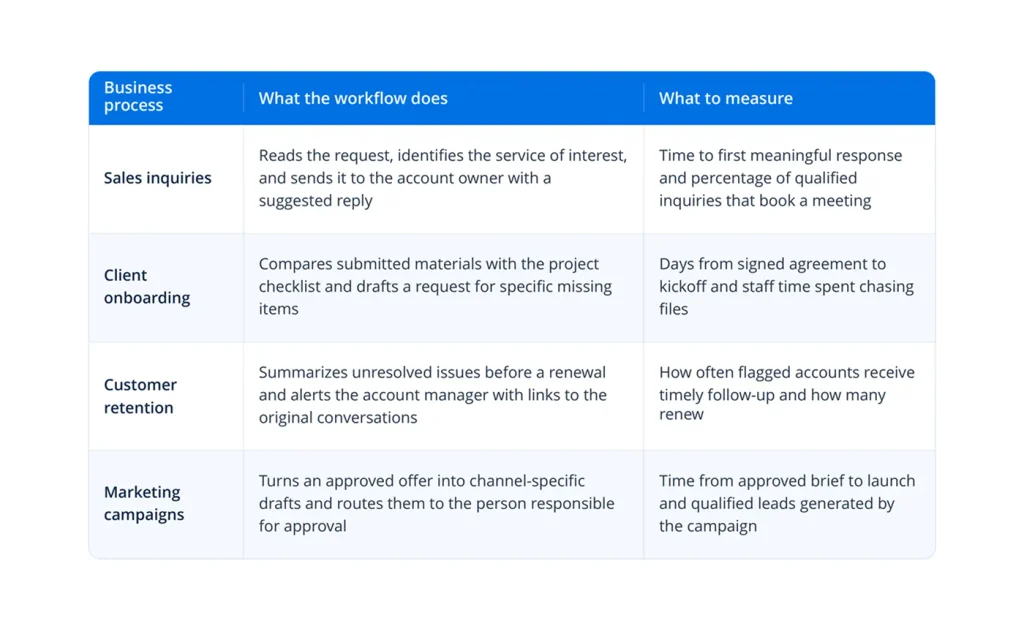
Choose a process where a delay has a consequence you can observe. If proposals go out on time but buyers regularly question the scope, faster drafting solves the wrong problem. A workflow that checks the proposal against the discovery notes before review is a better fit.
[Also Read: Benefits of Leveraging AI for Small Business Marketing]
What an AI Sales Workflow Looks Like in Practice
Imagine a commercial cleaning company receives this website inquiry: “We’re opening a second office in March. Can you quote for evening cleaning three times a week?”
That short message contains several useful details. It also leaves out the size and location of the office. Here’s how the business could turn it into a sales conversation.
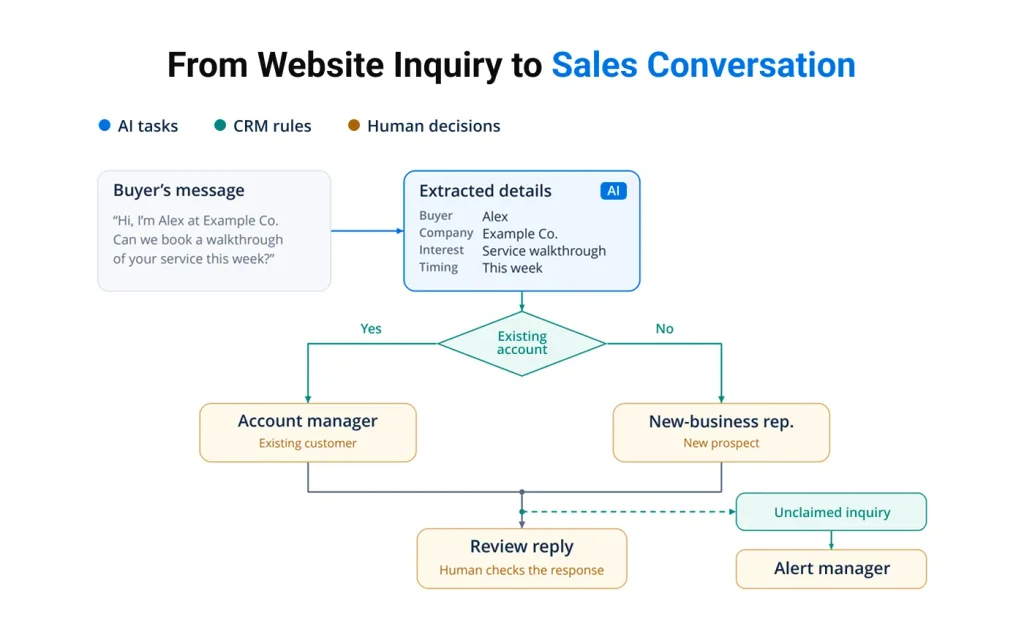
- Capture the inquiry. The form submission creates a CRM record with the original message, contact details, and submission time.
- Identify what the buyer needs. AI extracts the service, frequency, and target start date. It marks the address and square footage as missing. The representatives can see the original wording alongside the summary.
- Find the right owner. A CRM rule checks for an existing account. A match sends the inquiry to its account manager. An unfamiliar contact goes to the new-business queue.
- Prepare a useful response. AI drafts a short email asking for the two missing details and offering a walkthrough. The representative checks the draft and confirms availability before sending it.
- Follow the inquiry through. The CRM records the reply and creates a follow-up task. If nobody accepts the inquiry within the team’s response window, the sales manager gets an alert.
The buyer gets an email that picks up where their message left off. They have already said how often they need cleaning, so asking them to fill out a second form with the same question would add friction. This is where AI earns its place in the workflow. It can interpret a request written in everyday language, while ordinary CRM rules handle ownership and reminders.
[Also Read: How Automated Lead Nurturing Delivers Higher Win Rates?]
How to Build Your First AI Workflow
Start with one recurring delay
Ask the team to walk you through a few recent cases, including one that went smoothly and one that stalled. Look at the timestamps. Where did someone have to wait, copy information, search another system, or ask a colleague who was responsible?
Define a finish line the team can recognize. “Improve sales efficiency” is too broad to guide a pilot. “Every qualified website inquiry reaches a named representative with enough information for a useful first reply” gives you something concrete to build and test.
Give AI a specific job
Use AI where the inputs vary. Common examples include interpreting an open-ended request, summarizing a conversation, or drafting a response from approved information. Use fixed rules for exact decisions such as territory assignments, required fields, deadlines, and approved prices.
Give the workflow a way to handle uncertainty. If a customer asks about both a new purchase and a billing dispute, the workflow can flag the message for review and preserve both requests. Forcing it into a single category could send the sales opportunity to billing and leave the complaint unanswered.
Test the handoffs before expanding
Run a small pilot with one team, one channel, and a named owner. Review real examples together. Did the summary preserve the customer’s meaning? Did the right person get the task? When that person was out of office, did anyone else see it?
Those checks reveal problems that a polished AI draft can hide. A perfectly written email has little value if it goes to a former account owner or sits in an unmonitored queue.
How to Measure Whether AI Business Automation Is Driving Growth
Track three things together: how the process changed, how customers responded, and what it cost to run. For the sales workflow, that might mean first-response time, the share of qualified inquiries that booked a walkthrough, and the staff time spent reviewing replies or correcting routing mistakes.
Suppose a team handles 100 inquiries a month and cuts manual handling from 12 minutes to five per inquiry. That frees 11 hours and 40 minutes a month. It’s a capacity gain you can report immediately. To see whether it produces growth, look at what the team does with that time and what happens to comparable leads.
If bookings rise, check whether lead sources, promotions, or seasonality also changed. For example, a month with more referrals may produce more meetings even if response times stay the same. Comparing similar inquiries gives you a clearer view of the workflow’s contribution. Include software, setup, maintenance, and review time when deciding whether the result justifies expanding it.
Summing It Up
Think back to the prospect who wrote on Friday. Imagine they’d received a reply that afternoon from someone who understood the request, asked one useful question, and offered a time to talk. By Monday, your team could already have a meeting on the calendar. That’s where an AI workflow can make a difference your customer actually feels.
Start with one request your team handles every week. Give it a clear owner, use AI to help that person respond, and follow the result. Did more inquiries turn into conversations? Did more conversations lead to bookings or sales? Those answers will tell you which workflow is worth expanding.